Table of Contents
Best Free Gradient Generator Tools 2025: Gradienta vs Coolors vs ColorSpace (Comparison)
Introduction: Why Gradients Matter in Modern Design
A gradient generator has become an indispensable tool for designers, developers, and content creators in 2025. The best gradient tool transforms your design workflow by eliminating the need for complex Photoshop processes or hiring expensive designers. Whether you’re building a website, creating social media graphics, or designing app interfaces, understanding how to use a free gradient maker can dramatically elevate your visual output.
Gradients are no longer just decorative flourishes from the early internet era. Today’s gradient design represents a sophisticated approach to visual communication. Modern web design increasingly relies on gradients to add depth, dimension, and visual interest without compromising performance. Unlike heavy background images, gradients maintain lightning-fast load times while creating professional, polished aesthetics that users expect from contemporary brands.
The gradient generator landscape has evolved dramatically. What once required advanced coding knowledge or expensive software now becomes accessible through intuitive online tools. A quality gradient background maker enables you to create CSS gradients directly in your browser, export them immediately, and implement them across your projects without any technical barriers.
The importance of selecting the right gradient generator extends beyond convenience. The best gradient tool impacts your design consistency, export capabilities, mobile responsiveness, and ultimately, your audience’s experience. This comprehensive comparison explores the leading gradient generators available today, helping you identify which platform aligns perfectly with your specific needs and workflow preferences.
⚡ Try Gradient Generation Now
Skip to our integrated gradient generator that combines powerful features with simplicity. Create custom gradients in seconds and apply them to your designs instantly.
Complete Gradient Generator Comparison Table
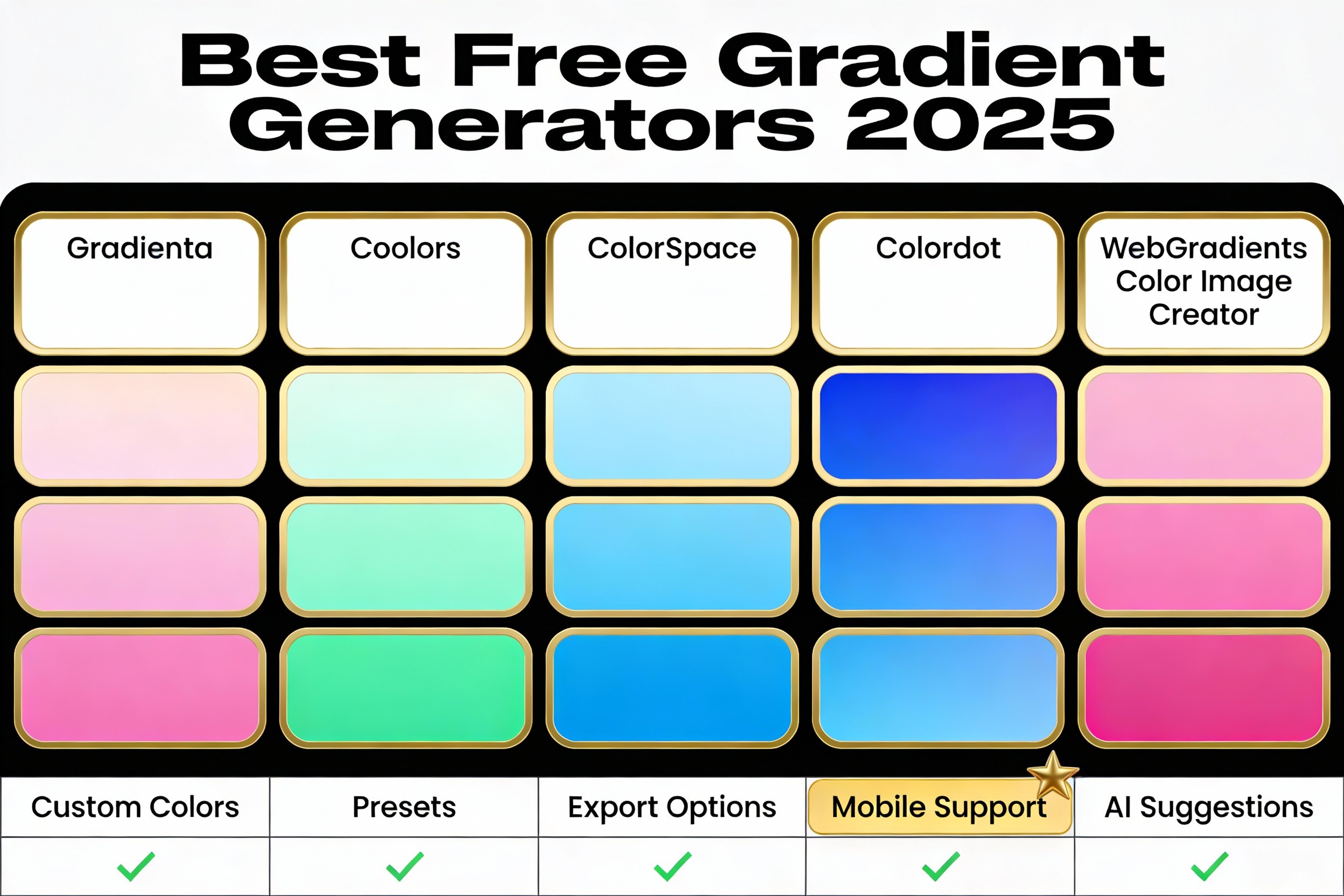
This comprehensive table presents the key features of leading gradient generators, helping you quickly identify which gradient tool best matches your requirements.
| Gradient Generator | Ease of Use | Custom Colors | Preset Gradients | Export Options | Mobile Support | Color Stops | Angle Control | Best For |
|---|---|---|---|---|---|---|---|---|
| Gradienta | Excellent | ✓ Full | ✓ Large Library | CSS, Image, Code | ✓ Optimized | Unlimited | ✓ Advanced | Professional Designers |
| Coolors | Very Good | ✓ Full | ✓ Medium Library | CSS, JSON, Image | ✓ Responsive | 2-10+ | ✓ Standard | Web Developers |
| ColorSpace | Good | ✓ Full | ✓ Algorithm-Based | CSS, Hex, SVG | ✓ Yes | 2-3 | ✓ 10 Directions | Quick Palette Generation |
| WebGradients | Excellent | ✓ Limited | ✓ 180+ Presets | CSS, PNG, Code | ✓ Full | 2-3 | ✓ Standard | Beginners, Quick Use |
| Color Image Creator | Excellent | ✓ Full Control | ✓ Custom Options | PNG, JPG, WebP | ✓ Highly Optimized | Unlimited | ✓ Full | Social Media, Bulk |
| Colordot | Excellent | ✓ Limited | ✓ Interactive | CSS, Hex, RGB | ✓ Mobile-First | 2 | ✓ Standard | Mobile Users, Learning |
As this comparison table demonstrates, the best gradient generator depends entirely on your specific use case. Professionals requiring unlimited customization and batch processing gravitate toward Gradienta and our Color Image Creator, while beginners and quick-turnaround projects benefit from WebGradients’ extensive preset library. The next sections provide in-depth reviews of each platform.
Gradienta: Premium Gradient Generator Review
Gradienta stands as one of the most powerful gradient generator tools available for professionals. This gradient background maker excels at delivering advanced features without overwhelming users with complexity. The platform provides an intuitive interface that combines powerful gradient customization with an impressive library of pre-designed gradients.
The interface of Gradienta makes gradient creation feel natural. Users select their starting and ending colors, adjust the angle with precision controls, and immediately see their gradient render in real-time. The preview feature shows exactly how your gradient will appear on various backgrounds, eliminating guesswork from the design process. Unlike simpler gradient generators, Gradienta allows you to add multiple color stops, creating complex, multi-color gradients that would otherwise require advanced coding knowledge.
One of Gradienta’s standout features is its massive collection of preset gradients. The gradient generator includes trending palettes, seasonal collections, and curated selections that keep pace with current design trends. Each preset gradient is immediately customizable, allowing you to use it as-is or modify it for your specific brand requirements. This approach balances inspiration with flexibility.
Export capabilities from this gradient tool cover every modern requirement. You can download your gradient as CSS code for direct implementation into websites, as image files for social media, or in SVG format for maximum scalability. The CSS output includes all necessary vendor prefixes, ensuring cross-browser compatibility without additional work.
Gradienta Strengths: Professional feature set, extensive preset library, real-time preview, multiple export formats, excellent documentation, active community, regular feature updates.
Gradienta Considerations: Can feel feature-heavy for absolute beginners, some advanced options require understanding CSS basics, free version has minor limitations compared to premium tier.
Coolors: Color-Powered Gradient Generator
Coolors represents a different philosophy in gradient generation—beginning with color theory and expanding to gradient creation. This best gradient tool starts with color harmony and builds comprehensive design palettes, including beautiful gradients as a natural extension of the color palette process.
What distinguishes Coolors as a gradient background maker is its emphasis on color relationships. Rather than simply allowing any two colors to combine, Coolors uses color theory principles to suggest gradient transitions that maintain visual harmony. When you use the gradient generator feature, it considers complementary colors, analogous combinations, and triadic relationships to ensure your gradients feel intentional rather than random.
The gradient generator within Coolors integrates seamlessly with the platform’s broader color ecosystem. Create a color palette, then instantly generate gradients using those palette colors. This workflow proves invaluable for maintaining brand consistency across your entire project. Every gradient naturally complements your established color scheme.
Mobile optimization within Coolors’ gradient tool is exceptional. The responsive design means creating beautiful gradients works equally well on smartphones and desktops. Users on tablets and phones appreciate the touch-friendly interface that makes gradient customization intuitive even on smaller screens. This mobile-first approach reflects the reality that many designers work on-the-go.
Export options from this gradient maker include CSS code, JSON for programmatic use, and image formats for design tools. The CSS output is production-ready, requiring no additional processing before implementation on live websites.
Coolors Strengths: Color theory integration, mobile optimization, palette synchronization, clean interface, excellent community, works offline, keyboard shortcuts.
Coolors Considerations: Fewer preset gradients than some alternatives, customization options less extensive than advanced tools, learning curve for color theory newcomers.
ColorSpace: Multi-Color Gradient Master
ColorSpace offers a unique approach to gradient generation that emphasizes algorithmic color discovery. Unlike traditional gradient generators that require manual color selection, this gradient tool can generate harmonious gradient combinations based on a single input color.
The algorithm underlying ColorSpace analyzes your selected color and suggests complementary color palettes, each potentially becoming a stunning gradient. The gradient generator creates dozens of possibilities instantly, showing you options you might never have discovered through manual exploration. This approach accelerates the design process while introducing fresh perspectives.
For designers seeking gradient inspiration or needing to generate multiple variations quickly, ColorSpace functions as an invaluable brainstorming partner. Each algorithmic suggestion represents a tested color combination that maintains visual balance and aesthetic appeal. The best gradient tool for discovery-driven design work, ColorSpace lets you explore new color territories without the pressure of making every choice consciously.
The gradient feature within ColorSpace supports multi-color gradients with customizable angles. While simpler than some gradient generators, the trade-off is immediate usability. Newer users appreciate the straightforward approach, while experienced designers value the speed of generating multiple options in seconds.
The export functionality provides CSS code suitable for web implementation. Hex color codes are highlighted for those who need specific color values for print or design software integration.
ColorSpace Strengths: Algorithmic discovery, instant variation generation, simple interface, fast workflow, excellent for inspiration, low learning curve.
ColorSpace Considerations: Limited color stop control, fewer export format options, less suitable for highly specific custom gradient requirements, preset customization options less extensive.
Other Top Gradient Generators: Colordot, WebGradients, and More
The gradient generator ecosystem extends far beyond the major platforms. Each alternative tool serves specific needs and preferences within the design community.
WebGradients: Simplicity and Inspiration
WebGradients represents the “preset-first” approach to gradient generation. With 180+ beautifully curated gradients, this gradient background maker prioritizes inspiration and speed over customization. The interface shows full-screen previews of each gradient, making selection visual and intuitive.
For designers working under tight deadlines or seeking immediate inspiration, WebGradients functions as a mood board and asset library combined. Copy the CSS code, download the gradient as an image, or share the URL with collaborators. The simplicity that makes WebGradients accessible also limits its customization depth, but for many users, that’s exactly the right balance.
Colordot: Mobile-First Gradient Generator
Colordot prioritizes mobile and touch-based interaction in gradient generation. Swiping, tapping, and dragging replace traditional click-and-scroll interfaces. This gradient tool proves perfect for designers who primarily work on tablets or prefer gesture-based controls.
The minimalist interface contains no menus or overwhelming options—just immediate, visual feedback as you adjust colors. The philosophy underlying Colordot is that design should feel natural and fun rather than technical. For learners and casual users, this gradient generator provides an excellent entry point.
CSS Gradient (cssgradient.io): Code-Focused Gradient Generator
CSS Gradient emphasizes code accuracy and technical control. Every aspect of your gradient—angle, color stops, opacity, positioning—is fully customizable through visual controls that update code in real-time. This gradient tool attracts developers who understand CSS intimately and want maximum control.
ColorZilla Ultimate CSS Gradient Generator: Advanced Customization
Available as both a web tool and browser extension, ColorZilla represents the professional-grade gradient generator for advanced users. Unlimited color stops, precise positioning, opacity control, and multiple gradient types (linear, radial, conic) give developers complete control. The browser extension integrates with your workflow seamlessly.
Advanced Feature Comparison: Angle Control, Color Stops, Animation
Angle Control and Gradient Direction
Every professional gradient generator includes angle control, but the precision and ease vary significantly. Simple tools offer preset directions (top, bottom, left, right, diagonal), while advanced gradient generators allow exact degree specifications. For web design, precision matters—a 45-degree gradient creates vastly different visual impact than 50 degrees when applied to large backgrounds.
The best gradient tool for your needs depends on your typical workflow. If you frequently need specific angles, Gradienta and ColorZilla provide numerical input fields allowing angle entry in single-degree increments. Others require dragging and visual estimation. Neither approach is inherently wrong; the choice depends on whether you design intuitively or mathematically.
Color Stops and Multi-Color Gradients
Color stops determine where colors transition within your gradient. A basic gradient has two color stops (start and end). A more complex gradient might include five or more color stops, creating rich, complex transitions. The best gradient generator for your project depends on how many colors you need.
Professional gradient generators like Gradienta offer unlimited color stops, enabling you to create gradients as simple or complex as your design requires. Others limit you to two or three colors, which suits quick work but frustrates those seeking detailed control. As you compare gradient tools, note how many color stops each permits.
Animation and Dynamic Gradients
Animated gradients represent the cutting edge of gradient design. Moving color transitions create subtle animation that enhances user engagement without seeming gimmicky. Not all gradient generators support animation export, which limits this feature to code-savvy users who can manually add CSS animations.
For brands seeking dynamic visual effects, consider whether your chosen gradient tool provides animation capabilities or at least generates CSS that’s easily adaptable to animation libraries. Some modern gradient generators include animation templates, making dynamic gradients accessible to non-developers.
Gradient Export Formats: CSS, SVG, PNG, and Beyond
CSS Code Export
Every gradient generator should export CSS code. Web developers need production-ready CSS that includes vendor prefixes for maximum browser compatibility. The best gradient tool generates code like: `background: linear-gradient(135deg, #667eea 0%, #764ba2 100%);` immediately copyable into stylesheets.
Quality gradient generators include both standard CSS and vendor-prefixed versions. They handle the technical details you’d otherwise manage manually, saving time and preventing cross-browser issues.
SVG Export
SVG (Scalable Vector Graphics) represent the ideal format for gradients used in illustrations and vector design. SVG gradients remain crisp at any size, making them perfect for responsive designs and print applications. Not all gradient generators support SVG export, but the best tools do.
SVG export proves particularly valuable when you’re designing icons, logos, or illustrations using gradients. The format integrates seamlessly with design tools like Figma, Sketch, and Adobe Illustrator.
Image Exports: PNG, JPG, WebP
Sometimes you need your gradient as an image file rather than code. Social media graphics, email templates, and design mockups often require image-based gradients. The best gradient background maker offers multiple image export options at specified dimensions.
PNG format maintains transparency, making it ideal for overlaying gradients on existing designs. JPG provides smaller file sizes for photos and complex gradients. WebP offers the best compression for web use. Quality gradient generators offer all three options.
Additional Export Formats
Specialized gradient tools might export LESS, Sass, or PostCSS formats for developers using CSS preprocessors. Some generate Figma-compatible code, Sketch plugins, or Adobe XD assets. When selecting your gradient generator, ensure it exports formats compatible with your existing workflow and design tools.
Creating Mobile-Ready Gradients: Best Practices
Mobile users represent the majority of web traffic in 2025. Your gradient generator must support creation of mobile-optimized gradients that load quickly and render beautifully on all devices.
Responsive Gradient Design
CSS gradients scale flawlessly across devices without performance degradation. Unlike background images, gradients don’t require multiple resolution versions. A single gradient works perfectly on mobile phones, tablets, and desktops.
The best gradient tool for mobile design is one optimized for touch interaction. Try Colordot or mobile-optimized versions of Coolors and Gradienta. These gradient generators provide responsive interfaces that work naturally on small screens, letting you design gradients the way you’ll use them.
Performance Considerations
While CSS gradients are lightweight, performance depends on complexity and application scope. A full-screen background gradient requires more processing power than a small accent gradient. Use complex multi-color gradients sparingly, especially on mobile devices with limited processing power.
The best practice: test your gradients on actual mobile devices. What looks perfect on desktop might strain lower-end phones. If performance suffers, simplify your gradient or convert it to an optimized image format.
Mobile-Specific Gradient Features
Certain gradient features matter particularly for mobile design. Angle flexibility helps you create gradients that work within portrait orientations. Color stop control ensures smooth transitions on mobile screens where banding becomes visible more quickly due to screen characteristics.
When choosing a gradient generator for mobile-first design, prioritize tools with strong mobile interfaces and mobile-specific optimization guidance.
AI-Powered Gradient Suggestions: The Future of Design
Artificial intelligence is revolutionizing gradient generation. AI-powered gradient generators analyze design trends, color psychology, and user preferences to suggest gradients that look modern and on-brand.
How AI Gradient Generators Work
AI-powered gradient tools accept natural language descriptions of your design goal. You might write “warm sunset aesthetic with professional blue accents” or “minimalist gradient for tech startup.” The algorithm generates gradient options matching your description, providing instant creative direction.
This approach eliminates blank-page syndrome and accelerates the creative process. Rather than starting from scratch, you receive intelligent suggestions informed by millions of design examples. The best gradient generator using AI learns from your feedback, improving suggestions as you interact.
Benefits and Limitations
AI gradient generation excels at inspiration, trend alignment, and rapid iteration. You generate dozens of options in seconds, selecting the best and refining further. The limitation: AI suggestions reflect training data patterns. Truly innovative, unique gradient designs still require human creativity and decision-making.
The optimal approach combines AI-generated suggestions with manual refinement. Use AI to establish direction and explore possibilities, then apply your design judgment to create truly distinctive gradients.
Our Gradient Generator: Integrated Color Image Creator Advantages
The Color Image Creator represents our commitment to providing integrated design tools that eliminate workflow friction. Unlike standalone gradient generators, our platform combines gradient creation with complementary image processing, color selection, and batch operations.
Integrated Color Picker with Gradient Generation
When you create gradients within Color Image Creator, you have access to our advanced color picker tool, enabling you to extract perfect colors from reference images. Need a gradient that matches your brand’s color palette? Extract colors from your logo, then immediately generate gradients using those precise colors. This integrated workflow eliminates switching between multiple tools.
Instant Social Media Size Customization
Social media platforms require specific image dimensions for optimal display. Our gradient generator includes preset sizes for Instagram posts, Facebook covers, YouTube thumbnails, LinkedIn banners, and more. Create your gradient, instantly customize its size for your target platform, and download ready-to-post images. This feature saves significant time compared to opening design software and manually resizing.
Batch Gradient Processing
Need to apply gradients to multiple images? Use our bulk image processor to apply gradients across dozens of images simultaneously. This capability is invaluable for creating consistent visual treatments across large image libraries, social media feeds, or content collections.
Export Flexibility
Our Color Image Creator exports in PNG, JPG, and WebP formats, giving you complete flexibility for different use cases. PNG for web with transparent backgrounds, JPG for maximum compression, WebP for cutting-edge web optimization. Each export option includes quality controls, ensuring you get exactly what you need.
Unique Advantages Over Standalone Gradient Generators
Unlike traditional gradient generators, our platform integrates gradient creation with the full context of your design workflow. You’re not jumping between tools—everything exists in one seamless environment. Create gradients, pick colors from images, resize for different platforms, apply watermarks, and process in bulk without leaving our interface.
This integrated approach particularly benefits content creators managing multiple projects and platforms. Social media managers, graphic designers, and digital marketers find tremendous efficiency gains when all gradient and image tasks consolidate into a single platform.
🚀 Try Our Integrated Gradient Generator Free
Create beautiful gradients and instantly customize them for any platform—no technical skills required. Our Color Image Creator combines power with simplicity.
Gradient Generators: Which Tool is Best For You?
Best Gradient Generator for Absolute Beginners
If you’ve never created a gradient before, start with Colordot or WebGradients. Colordot’s gesture-based interface removes technical barriers, while WebGradients’ extensive preset library means you’re only one click away from beautiful results. Neither tool requires CSS knowledge or design experience—just intuition and aesthetic preference.
Best Gradient Tool for Web Developers
Developers creating custom websites should choose Gradienta or ColorZilla. Both provide precise control over every CSS property, exact angle specifications, unlimited color stops, and production-ready code output. The learning curve is steeper, but the creative possibilities are limitless. For developers using CSS preprocessors, ensure your chosen tool exports compatible code.
Best Gradient Generator for Designers
Graphic and UI designers benefit most from Gradienta or our Color Image Creator. Both tools bridge design and development, allowing you to create gradients visually while maintaining technical precision. The integration with design workflows, export flexibility, and large preset libraries make these platforms indispensable for professional designers.
Best Gradient Background Maker for Social Media Content Creators
If you create content for Instagram, TikTok, YouTube, or other social platforms, our Color Image Creator stands out. Instant platform-specific sizing, batch processing, and integration with image editing tools streamline your workflow dramatically. Create gradients, customize sizes, and upload within minutes—no design software required.
Best Gradient Tool for Color Exploration and Learning
Use ColorSpace or Coolors to understand color theory and discover harmonious combinations. Both tools educate while generating beautiful results. Their algorithmic approach shows you color possibilities you might never discover through manual exploration, making them perfect for design students and color theory enthusiasts.
Best Gradient Generator for Speed and Efficiency
When deadlines loom and you need immediate results, WebGradients and Colordot deliver. Hundreds of gorgeous presets mean you’re always seconds away from perfect results. No customization required—just select, copy, implement.
Frequently Asked Questions About Gradient Generation
What is a gradient generator, and do I really need one?
A gradient generator is an online tool that creates smooth color transitions from one shade to another. You don’t strictly need one—you could write CSS gradients by hand—but a quality gradient background maker saves tremendous time and produces better results. Even experienced developers use gradient generators for inspiration and rapid prototyping.
Can I use gradients from gradient generators on commercial projects?
Yes, absolutely. Gradients generated through online tools are typically free to use commercially. The gradient generator itself generates original content based on your color selections. Always check individual tool terms of service, but most modern gradient generators explicitly permit commercial use of your generated gradients.
What’s the difference between CSS gradients and image-based gradients?
CSS gradients are generated by browser code—lightweight, infinitely scalable, and responsive across devices. Image gradients are saved files that must load separately. For modern web design, CSS gradients are superior: faster, smaller, and more flexible. Use image gradients only when CSS limitations prevent your desired effect.
How do I apply a gradient to my website using a gradient generator?
Most gradient generators export CSS code. Copy the CSS from your gradient generator, paste it into your stylesheet or element’s style attribute, and you’re done. The code typically looks like: `background: linear-gradient(45deg, #667eea 0%, #764ba2 100%);` Include this in your CSS, and the gradient appears immediately.
Can I animate gradients created in a gradient generator?
Not directly through most gradient generators, but the CSS they produce is absolutely animatable. You can add CSS animations that change gradient colors, angles, or positions over time. This requires some CSS knowledge, but the foundation created by your gradient generator makes animation straightforward.
Which gradient generator is best for creating mobile backgrounds?
For mobile-specific design, choose a gradient tool optimized for touch interaction and mobile preview, like Colordot or mobile-optimized Coolors. However, remember that CSS gradients scale flawlessly across all devices. Any quality gradient generator produces mobile-friendly results; the advantage of mobile-optimized tools is their design interface, not their output.
How many colors can I use in a gradient?
This depends on your chosen gradient generator. Simple tools limit you to two colors. Advanced generators like Gradienta permit unlimited color stops, enabling gradients with five, ten, or more color transitions. For most design purposes, three to five colors create beautiful, balanced gradients without overwhelming the viewer.
Are there free gradient generators, or do I need to pay?
Excellent free gradient generators abound. Gradienta, Coolors, ColorSpace, WebGradients, Colordot, and many others offer comprehensive free functionality. Premium tiers might add advanced features, but the free versions produce professional-quality gradients suitable for virtually any project. You don’t need to pay to create stunning gradients.
Can I export gradients as SVG from every gradient generator?
Not all tools support SVG export. When SVG compatibility matters for your project—typically in illustration or icon design—confirm your chosen gradient generator includes this option. Gradienta, ColorZilla, and several others do support SVG export.
What’s the best way to choose between multiple gradient generators?
Test several tools on a real project. Try Gradienta for advanced features, WebGradients for inspiration, and our Color Image Creator for integrated workflow. Most gradient generators are free to explore—spend 15 minutes with each to understand which interface and features align with your workflow and preferences.
Conclusion: Choosing Your Perfect Gradient Generator
The gradient generator landscape offers remarkable diversity, ensuring tools exist for every skill level and workflow preference. Whether you’re a beginner exploring color for the first time, a developer demanding precise technical control, or a designer managing multiple projects across platforms, the perfect gradient tool awaits.
Gradienta excels for professionals requiring unlimited customization and extensive presets. Coolors serves those integrating gradients into comprehensive color systems. ColorSpace generates endless inspiration through algorithmic discovery. WebGradients and Colordot deliver speed and accessibility for quick, beautiful results. Our Color Image Creator combines gradient generation with integrated image processing, creating unprecedented workflow efficiency.
The best gradient tool isn’t necessarily the most feature-rich—it’s the one that integrates seamlessly into your specific workflow and matches your technical comfort level. Start with one or two tools from this comparison, invest 15 minutes learning their interfaces, then commit to mastering the gradient generator that feels most natural.
Gradients represent the future of modern web design and digital content creation. They add dimension, guide user attention, and create memorable visual experiences. By selecting the right gradient generator for your needs, you gain the ability to create professional-quality visual assets, whether for personal projects or commercial ventures.
The tools are free, the learning curve is gentle, and the creative possibilities are limitless. Your next beautiful gradient awaits—you just need to choose which gradient generator will help you create it.
🎨 Start Creating Beautiful Gradients Today
Don’t overthink it. Pick a gradient generator from this guide, spend 15 minutes exploring, and create something beautiful. Your designs will thank you.
All tools mentioned are free to use. No credit card required. Start today.